
OpenAI’s product lead dropped this crash course on building, pricing and launching AI products
Product teams are stuck in building AI agents and workflows. They look impressive but hardly move the needle. This crash course teaches you how to craft, launch, and monetize commercial AI products.


Most AI product conversations are stuck on showing shiny demos and creating hype.
But real product practitioners know that without sustained commercial success and effective distribution, these AI products aren’t really moving the needle.

Teams wonder why adoption is slow, pricing feels random, and users don’t trust the intelligence they’ve built.
We need to move beyond stitching n8n tapestries and wooing over the next MCP drop. What separates products that win from products that disappear is how you launch them, price them, and design trust into every interaction.
Today, I’m handing the mic to someone who actually knows how this works.
Miqdad Jaffer is a Product Lead at OpenAI, helping their biggest partners ship AI products that people actually use. Before that, he led AI product work at Shopify.
He’s written something rare for the Behind Product Lines community: a complete crash course that connects AI product building with the launch and pricing strategy most teams ignore until it’s too late.
This aligns with the core value of this newsletter: ending the disconnect between product and marketing/GTM.
Here’s what you’ll learn:
→ Why AI products fail not because the model is weak, but because the experience around the model is weak
→ The 4D Method for building AI products (Discover, Design, Develop, Deploy) that actually ship with trust built in
→ How to price AI products when users judge value differently than SaaS, and why most usage-based pricing kills activation
→ The psychological triggers that drive AI adoption and why autonomy is earned, not assumed
→ How to launch AI features so users trust them before competitors replicate them
Special Offer: $500 off for the AI Product Management Certification on Maven
I’ve heard countless product leaders, managers, and marketers take the AI Product Management Certification and share highly positive feedback. It’s a 6-week, hands-on cohort led by Miqdad Jaffer (Product Lead at OpenAI).
And now, the “Behind Product Lines” community can get $500 off by registering using this link.

The November and December cohorts are already sold out. The next available cohort starts in January 2026, so it's best to act fast if you’re interested.
Note: If you’re viewing this in your email, I highly recommend you jump to the web version, as this is a massive deep dive that won’t fit in your inbox. Bookmark it now.
Alright then. Without further ado, here’s Miqdad:
Complete Crash Course in Building, Pricing, and Launching AI Products
Most people assume AI has reinvented product management.
It hasn’t.
What AI has actually done is far more uncomfortable: it has removed every safety net PMs used to hide behind.
There was a time when vague problem statements, fuzzy user research, confusing UX, and bloated product thinking could still make it through the system because product cycles were long, switching costs were high, alternatives were limited, and users tolerated mediocrity.
That world is gone.
AI didn’t suddenly turn everyone into a brilliant PM.
AI simply made the cost of being a bad PM immediate and brutally visible.
Because when you ship an AI product:
Users expect intelligence on Day 1.
They expect clarity without being taught.
They expect magic without friction.
And they expect the product to understand their world without them having to explain it.
There is no onboarding flow long enough, no tooltip helpful enough, and no tutorial polished enough to compensate for an AI that feels dumb, unpredictable, or untrustworthy.
Before we dive into anything, you need to understand these 9 shifts in product management after AI took over.
Chapter 1: 9 Shifts in AI Product Management
1.1 AI Makes Product Mistakes Obvious
An average SaaS feature can hide behind onboarding, documentation, customer success, or UI refinement.
But an AI workflow? It either works or it breaks trust.
There is no in-between.
And once trust erodes, users don’t say: “Hmm, that feature has some bugs.”
They say: “I don’t trust this product anymore.”
One wrong output. One hallucination. One moment of uncertainty.
Gone.
This is why PMs who focus only on “cool AI features” and ignore trust design are quietly setting themselves up for failure.
1.2 AI Shifted PMs From Feature Thinking → System Thinking
Traditional PM work is comfortable → Write a PRD. Define acceptance criteria. Work with design. Debate edge cases. Align with engineering. Ship.
AI work forces PMs to think horizontally and vertically at the same time.
You are no longer defining features, you are orchestrating systems:
Systems of context
Systems of memory
Systems of retrieval
Systems of reasoning
Systems of failure recovery
Systems of autonomy and control
The PM must understand enough about how intelligence works to design these outcomes with confidence.
1.3 AI Compressed Timelines (and Expectations)
PMs used to have months to explore a space, understand a problem, get alignment, and validate ideas.
Now executives expect a direction in hours, not weeks, because:
PMs can explore domain knowledge with AI
PMs can generate 10 prototypes before lunch
PMs can gather feedback within the same workday
PMs can simulate usage patterns without writing code
And competitors can replicate features overnight
This isn’t a gentle acceleration.
It’s a collapse of the entire decision-making cycle.
You cannot hide indecision behind “We’re still validating.”
You are expected to validate fast, think fast, converge fast, and iterate fast.
This means your judgment must evolve even faster than your output.
1.4 AI Broke the Old Product Hierarchy
The old hierarchy is dead: PM → Design → Engineering → QA → Launch
That linear flow made sense when prototypes required design talent and engineering time.
Now the PM is expected to:
build interactive prototypes
write system-level reasoning flows
generate evaluation tests
model token cost curves
design onboarding drafts
create UX alternatives
generate 30 versions of messaging
and pressure-test feasibility
before any designer touches Figma and long before engineering starts planning sprints.
This is the new bar: “If you can’t prototype your idea, you don’t understand your idea.”
1.5 AI Created Two Types of PMs
You can already see it inside companies:
PM Type A — AI-Adjacent
They use ChatGPT as a convenience tool.
They can write prompts but can’t evaluate model behavior.
They can ideate but not simulate.
They can describe “AI features” but not architect intelligent workflows.
They sound smart in slides but collapse in technical conversations.
PM Type B — AI-Native (The future leaders)
They understand:
how systems handle context
what failure modes look like
where hallucinations will matter
how memory policies affect UX
how to design intelligent autonomy
how to price AI in nonlinear value curves
how to stitch product strategy with model behavior
how to evaluate reasoning quality
how to build trust into the workflow
These PMs don’t just ship AI.
They build AI that feels inevitable.
And because their work is leveraged, they become invaluable.
1.6 AI Amplified Judgment, Not Creativity
A harsh but liberating truth:
AI can generate 100 ideas → AI can write 20 PRD drafts → AI can create 6 UX flows → AI can prototype an agent → AI can list edge cases → AI can simulate personas.
But only the PM can decide:
which idea matters
which workflow is viable
which output is trustworthy
which use case is meaningful
which failure mode is catastrophic
what “good” looks like
what the business should bet on
The PM’s new superpower is not creativity, AI handles that.
It is judgment under acceleration.
Bad PM judgment used to take months to surface.
Now it surfaces in minutes.
1.7 AI Turned Distribution Into a PM Responsibility
In AI products, distribution is no longer a marketing function.
Distribution is a product experience function.
Because in AI:
onboarding is positioning
trust-building is distribution
education is conversion
UX is messaging
intelligent defaults are activation
explanations are retention
If users don’t understand the product fast enough, they won’t come back.
If they don’t trust it, they won’t try it again.
If they don’t see value fast, they’ll replace you immediately.
AI PMs must think like:
a storyteller
a marketer
a UX psychologist
a behavior designer
a distribution strategist
And if that feels overwhelming, good — that’s the point.
This is the new bar.
1.8 In AI, the Middle Disappears
There used to be a safe middle ground… products that weren’t exceptional but weren’t terrible either.
They survived because alternatives were limited.
In AI, the middle evaporates.
You’re either:
magical or disappointing
trusted or abandoned
essential or irrelevant
valuable or forgotten
Because users can test substitutes instantly.
AI markets consolidate around winners faster than SaaS ever did.
This compresses the margin for error to almost zero.
1.9 PMs Now Manage Trust, Not Features
The secret job of an AI PM is not building features, it is engineering trust.
Trust is built through:
predictable behavior
transparent reasoning
recoverable failures
uncertainty disclosure
controlled autonomy
meaningful defaults
consistent tone
aligned expectations
low-friction workflows
If you want to master all the skills required to become an AI PM, then Product Faculty’s AI PM Certification with OpenAI’s Product Lead is for you.
It’s the only program that teaches and then forces you to actually build real AI products from scratch in their capstone projects. 3,000+ PMs have taken it. 660+ reviews. The highest-rated AI PM program on Maven.
If you want to transform your career in 2026, this is where you start.
To get $500 off, you can register using this link.
Now that you truly understand what real AI product management looks like, let’s dive into how to build AI products with our 4D Method.
Chapter 2: The 4D Method of Building AI Products
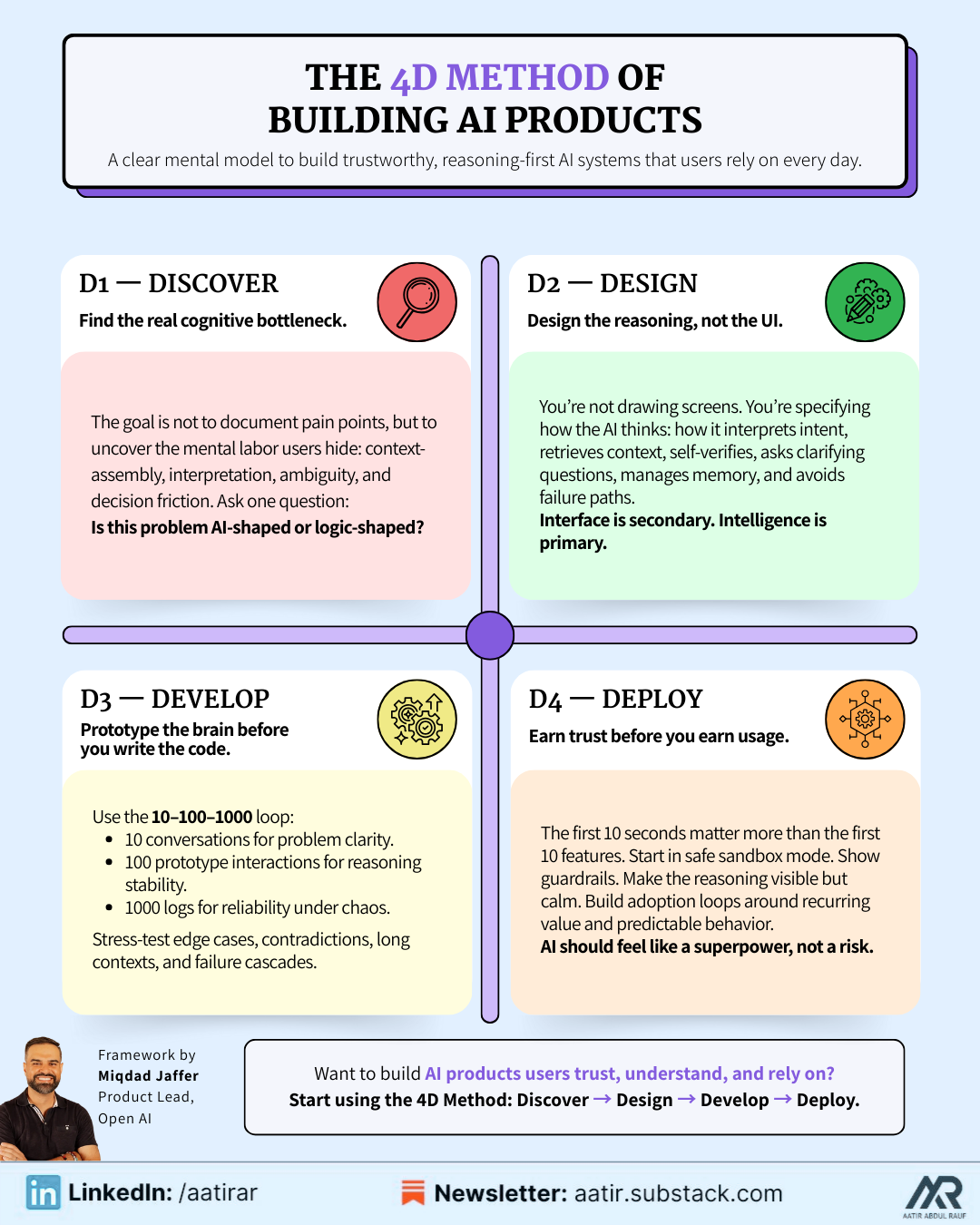
2.1: D1 — DISCOVER
Find the Real Problem, the Cognitive Load, and the Invisible Workflow Behind the Workflow.
Most PMs insist discovery is about collecting user quotes, documenting feature requests, and mapping obvious surface-level pain points.
But in AI product management, discovery transforms into something deeper and more demanding, it becomes the art of understanding how users think, where their cognition breaks down, where ambiguity arises, where mental friction accumulates, and where they resort to manual context-gathering that AI could eliminate entirely if only the PM had identified the correct cognitive bottlenecks.
Discovery is about looking beneath the task and uncovering the mental labor sustaining it.
It’s not “What step is difficult?”
It’s “What thinking is difficult?”
Great AI PMs identify:
Cognitive load hotspots: the hesitation, second-guessing, re-checking, and context-assembly moments.
Unstructured interpretation: where the user must read, summarize, extract, decide, or synthesize information from messy sources.
Variable workflows: where the user’s path differs based on judgment, nuance, or context.
Ambiguous intent zones: where users want something but cannot articulate a clear set of steps.
Context dependency: where users constantly switch tabs, search, gather files, or recall information from memory.
And they answer the most important question of all:
Is this problem AI-shaped? Meaning: does it involve ambiguity, reasoning, judgment, interpretation, context-building, or variable pathways?
Or is it logic-shaped, meaning deterministic rules outperform AI every time?
DISCOVER Failure Mode: Teams assume the presence of AI justifies building an AI feature, when in reality, the problem never required intelligence, only workflow clarity or automation.
2.2: D2 — DESIGN
Design the Reasoning, Not the UI; the Context, Not the Button; the Intelligence, Not the Interface
Most PMs enter the design stage thinking about screens, buttons, toggles, and UI mechanics, but AI product design is nothing like traditional UX.
Here, you are designing the thinking engine inside the system — the set of carefully sequenced reasoning steps, context rules, guardrails, clarifying questions, fallback behaviors, and safety constraints that make the AI appear competent, reliable, and trustworthy.
Designing an AI product means you are literally specifying how the machine should think, how it should interpret messy input, how it identifies missing information, how it retrieves and prioritizes context, how it self-verifies, how it expresses uncertainty, how it recovers from failure, and how it asks for clarification when human intent is ambiguous.
In DESIGN, great PMs:
Craft the reasoning blueprint, a step-by-step sequence the AI should follow internally, defining how it interprets intent, retrieves context, evaluates relevance, forms an internal plan, executes tasks, and verifies correctness.
Design the context pipeline, deciding what the AI must see first, what it should retrieve automatically, what it should ignore entirely, what it must ask for, and how it manages long, messy, or conflicting information.
Specify the memory strategy, which is not “save everything” but rather a selective, intentional approach to storing preferences, patterns, ongoing tasks, and previous decisions without allowing the model to drift into unpredictable territory.
Determine the tool strategy — meaning whether the AI should search, fetch data, update records, send messages, or perform actions — and exactly what constraints, confirmations, and safe boundaries those actions must follow.
Build the failure-first design, mapping out the worst-case hallucinations, the cascade failures, the misinterpretations, and the actions that could cause harm, and then designing guardrails to prevent them.
Remember, AI UX is not about showing options; it is about interpreting intent, guiding decisions, adapting interactions, and making the workflow feel like the system already understands the user.
If you design the interface first and the intelligence second, the product will behave unpredictably even if it looks beautiful.
2.3: D3 — DEVELOP
AI development is not engineering.
It is controlled chaos.
It is a repeated failure by design.
In the DEVELOP phase, PMs manually simulate behavior using LLMs to refine reasoning, context, memory, retrieval, and guardrails before engineering ever touches code.
Rely on the 10–100–1000 Validation Loop:
10 Conversations → Problem Clarity: Validate that the user problem is real, recurring, painful, and cognitively expensive.
100 Prototype Interactions → Reasoning Stability: Run manual prototypes to test reasoning steps, clarifying questions, retrieval quality, failure patterns, and ambiguity-handling.
1000 Logs → System Reliability: Analyze real logs to discover:
hallucination triggers,
retrieval drift,
missing context,
multi-step collapse,
cost explosions from poor prompting,
latency failures under load,
cascading tool failures.
Stress-Test Reality
You purposely sabotage the prototype:
remove key information,
feed contradictory instructions,
overload context windows,
introduce noise,
test edge cases,
push long conversations,
force unusual formats,
trigger multi-step logic.
This is how the real system’s failure map emerges.
Cost & Latency Modeling
You analyze how the system behaves at:
10K users,
100K users,
1M users.
Because AI systems often appear cheap but scale expensively if context and reasoning are not tightly controlled.
Teams test the “happy path” and ignore the real-world chaos that destroys AI products at scale.
2.4: D4 — DEPLOY
AI products do not fail because the model is weak; they fail because the experience around the model is weak.
Meaning users don’t trust it, don’t understand it, don’t feel in control, or don’t know how to use it.
In DEPLOY, great PMs understand:
The first 10 seconds matter more than the first 10 features.
AI products must demonstrate value before teaching interaction.
Trust is earned through clarity, boundaries, predictable behavior, and visible guardrails, not through branding or documentation.
The system must start in safe, reversible sandbox mode, then earn the right to gain autonomy through a structured, controlled rollout.
Users must see internal reasoning in a form that feels confident, not overwhelming, because transparency without coherence destroys trust.
Pricing must align with workflow value and risk, not with vanity metrics like token usage or seat count.
Adoption loops must be engineered: recurring value, sticky workflows, context continuity, and repeat-trigger moments that reinforce how indispensable the system becomes over time.
Observability is essential. AI products break silently, and the only way to protect trust is through proactive logs, telemetry, alerts, and behavioral insights.
AI products must make users feel like they
are gaining superpowers, not like they are relinquishing control.
Steal this System Prompt to apply the 4D Method
You are an expert AI product strategist who uses the 4D Method (Discover → Design → Develop → Deploy) to help product managers build AI features and systems that are trustworthy, reliable, context-aware, and deeply aligned with user psychology and workflow pain.

Your job is to take the product information I enter and return a complete, extremely detailed 4D analysis that includes:

- user psychology
- cognitive friction
- workflow analysis
- context mapping
- reasoning blueprint
-failure modes
- prototype stress-testing
- trust scaffolding
- onboarding design
- adoption loops
- guardrails
- and deployment strategy

The output MUST feel like the work of a senior PM who has shipped multiple AI products in production.

INPUT FORMAT  // fill the placeholders below

1. Product name: [PRODUCT NAME]

2. The AI capability / feature: [CAPABILITY]

3. Target user: [TARGET USER DESCRIPTION]

4. The workflow this AI supports or replaces: [REPLACES]

5. Pain points in the existing workflow: [PAIN POINTS]

6. The main outcome the AI should deliver: [OUTCOMES]

7. Risk level (low/medium/high): [RISK LEVEL]

8. Context sources the AI can use: [CONTEXT DOCS]

9. Level of autonomy desired: [AUTONOMY LEVEL]

10. Failure cases to avoid: [FAILURE CASES]

NOW GENERATE THE FOLLOWING USING THE 4D METHOD:

D1 — DISCOVER

Provide a long, deeply detailed discovery analysis including:

- the hidden cognitive load in the workflow
- ambiguity points
- mental overhead
- judgment-heavy steps
- failure-prone moments
- context switching
- trust barriers
- emotional friction
- which parts are AI-shaped vs. logic-shaped
- the real job-to-be-done
- motivations, fears, constraints
- the “invisible work” users currently do

where AI can remove thinking, not just clicks

D2 — DESIGN

Create a detailed reasoning architecture including:

- the reasoning blueprint (step-by-step internal logic)
- the context pipeline (what the AI must see, ignore, retrieve, store)
- clarifying questions for ambiguity
- memory strategy (what to persist or not)
- tool-use strategy (API calls, actions, permissions)
- fallback behaviors
- uncertainty expression
- adaptive UX patterns (how UI should shift based on intent)
- failure-first design
- how to prevent hallucinations
- how to communicate boundaries

D3 — DEVELOP

Provide a full development validation plan including:

- manual prototype instructions (using ChatGPT or internal models)
- the 10–100–1000 Validation Loop customized to this product
- stress tests (long inputs, conflicting inputs, missing context, noise)
- hallucination triggers
- retrieval drift checks
- context window overflow patterns
- cost modeling at 10K → 100K → 1M users
- latency tolerance analysis
- cascading failure scenarios
- prompt-breaking scenarios
- data quality assumptions
- pre-engineering risk mitigation

D4 — DEPLOY

Write a complete deployment strategy including:

- trust scaffolding
- output-first onboarding
- safe sandbox mode
- the autonomy staircase (suggest → draft → approve → execute)
- first value moment
- cognitive offload moments
- trust repair moments
- behavior predictability
- error recovery grace
- habit loops
- telemetry and observability
- how to prevent silent failures
- rollout sequencing
- long-term adoption loops
- Focus heavily on the emotional journey: confidence, safety, trust, predictability.

FINAL OUTPUT REQUIREMENTS

Your final response must:
- use long, rich, thoughtful sentences
- include structured sections and bullet points
- reference psychological and cognitive principles
- sound like a PM who has shipped AI in production
- avoid vague or generic “AI advice”
- be specific, practical, and strategic
Chapter 3: Pricing AI Products: The Hardest Skill in AI PM (and the One That Changes Everything)
Most PMs think pricing is a late-stage discussion.
Something you figure out after the product works, after the workflow stabilizes, after the feature becomes useful.
AI doesn’t work that way.
With AI products, pricing is part of the product design itself.
Because pricing affects usage, and usage affects model behavior, and model behavior affects trust, and trust affects retention, which loops back into how the value is perceived.
In other words: AI pricing isn’t a number. It’s a system.
A system of incentives.
A system of psychological thresholds.
A system of economic boundaries.
A system of performance expectations.
A system of guardrails on how users behave inside your product.
And most PMs underestimate how fragile these systems really are.
One important thing: AI Pricing Must Be Designed Around Perceived Intelligence.
You can get away with charging for SaaS features that are clunky, slow, or iterative.
But if you charge for AI and your system feels dumb, inconsistent, or “still learning,” the user’s conclusion is instant and unforgiving:
“Why am I paying for something that doesn’t work?”
Users pay for AI only when it crosses a psychological line:
The product must feel:
more capable than them
more consistent than them
faster than them
more informed than them
more reliable than their alternatives
If your product misses even one of these, pricing becomes a self-inflicted wound.
This is why AI PMs have to obsess over perceived intelligence.
The value and the price are inseparable.
3.1: The Three AI Pricing Models That Actually Work
Model 1 — Usage-Based Pricing
(“Pay for tokens / credits / tasks / actions”)
This model is intuitive because it mirrors how you pay for LLMs internally.
But it is also the riskiest model for user adoption.
Usage-based is only viable when:
the workflow’s value is extremely obvious
the output quality is consistently high
the product is mission-critical
the tasks are repetitive and predictable
the user understands what they’re paying for
the cost can be forecasted
And even then, you must battle:
credit anxiety
unpredictable cost spikes
fear of experimentation
cautious behavior during onboarding
users “saving credits” during learning moments
reduced product exploration
under-utilization because of cost fear
Most AI products fail with usage-based pricing simply because users are afraid to use them.
And a product that isn’t used cannot prove its value or justify its cost.
Usage-based is a great business model, but a terrible activation model.
Model 2 — Seat-Based Pricing
(“Pay per user per month”)
The most enterprise-friendly model.
Seat-based is perfect for:
team collaboration
multi-user workflows
agent-based tools that help teams
products that replace full-time roles
predictable, consistent output
If you sell into mid-market or enterprise, seat-based is your safest bet because:
CFOs understand it
procurement expects it
legal is set up for it
competitors use it
it creates clean forecasting
it reduces anxiety around usage
The downside?
You must prove:
broad team value
workflow integration
day-to-day utility
predictable performance
Seat licensing collapses if AI feels like a gimmick or “assistive toy.”
But if you nail core workflows, seat-based pricing becomes a printing press.
Model 3 — Outcome-Based Pricing
(“Pay when the system delivers a successful result”)
This is the future of AI pricing, especially in enterprise.
Perfect for:
sales automation
logistics & operations
fraud detection
retention prediction
financial insights
recruiting workflows
agent-run processes
Outcome pricing works because AI is probabilistic.
You’re essentially saying: “We only charge when the machine gets it right.”
This flips the trust equation.
But outcome-based pricing demands:
robust evaluation
aligned incentives
clear definitions of success
consistent model accuracy
deep integration with user workflows
High trust → high willingness to pay.
The challenge? Hard to implement, but incredibly defensible once deployed.
Outcome-based is the closest thing to printing money if your AI delivers measurable ROI.
3.2: The Hidden Costs PMs Forget When Pricing AI Products
AI PMs who don’t understand cost mechanics inevitably underprice their products, destroy margins, or overspend on latency/accuracy trade-offs.
Here’s the invisible cost stack most PMs ignore:
1. Hallucination Cost
Every hallucination triggers:
user distrust
support tickets
churn
extra evaluation cycles
UX redesign
prompt mitigation
retrieval tuning
Hallucinations are more expensive than tokens.
2. Latency Cost
Lower latency often means:
more expensive models
faster retrieval pipelines
higher concurrency needs
more caching complexity
Latency is a business model decision, not a technical one.
3. Evaluation Cost
AI requires continuous evaluation:
regression tests
output comparisons
golden datasets
edge case libraries
periodic drift analysis
And all of this must be priced in.
4. Token Burn From Poor Prompting
One sloppy system prompt can cost thousands per month.
Token waste is the silent killer of AI margins.
5. Retrieval Cost
Vector search, embedding refresh, and indexing all have real costs.
The more dynamic your context, the higher your operational bill.
6. Support Cost
When AI behaves unpredictably, support spikes dramatically, especially during:
onboarding
high-stakes outputs
edge cases
domain-specific requests
Your pricing must absorb this.
7. Trust Restoration Cost
When an AI output breaks trust, fixing that is 10× harder than preventing it.
This is the unseen cost PMs rarely price for.
3.3: Nine Tactical Pricing Tests Every AI PM Should Run Before Launch
When you’re building an AI product, the pricing model you choose will either unlock adoption or quietly suffocate it in the first 30 days.
These nine tests exist because AI pricing cannot be validated by surveys, gut feel, or copying competitors… AI must be validated through behavior, not opinions.
Each test below helps PMs uncover invisible psychological barriers that sabotage usage, retention, and revenue.
Let’s go deep.
Test 1 — The Latency-for-Cash Test
(The Only Honest Indicator of How Users Perceive Value)
AI value is nonlinear. To some users, speed is the entire product.
To others, accuracy is the entire product.
And here’s the nuance most PMs miss: If users won’t pay for speed, they generally won’t pay for anything.
Why?
Because speed is the clearest, most universal signal of “intelligence.”
When something responds instantly, users feel the product is:
more competent
more capable
more engineered
more premium
more intelligent
The test is simple:
Give users two versions of the same workflow:
Version A → fast, not perfect
Version B → slower, more accurate
Then ask: “Would you pay to get Version A’s speed in Version B?”
This tells you:
how much latency matters
what kind of pricing tiers you can design
whether you can upsell with speed
what your infrastructure budget can support
how much to invest in model upgrades
If speed = value, usage-based becomes dangerous.
If accuracy = value, outcome-based becomes ideal.
This test prevents you from building pricing around the wrong variable.
Test 2 — The Accuracy Elasticity Test
(How “Good” AI Has to Be Before Users Will Pay)
Every AI PM overestimates how much accuracy users demand.
The truth? Most users don’t need 100% accuracy — they need reliability and recoverability.
This test measures the elasticity curve between accuracy and willingness to pay.
Run this:
Show users AI outputs with different accuracy levels: 60% → 70% → 80% → 90% → 95%
Ask them: “At what point would you feel comfortable paying for this?”
The distribution tells you:
how good your product needs to be before charging
whether premium tiers are viable
where hallucinations become financially unacceptable
which user personas need higher accuracy
which personas tolerate lower accuracy
If your threshold is above 90%, you’re not building a consumer product, you’re building enterprise AI.
This test determines your entire GTM motion.
Test 3 — The Credit Anxiety Test
(Why Most Usage-Based AI Pricing Fails)
No test reveals user fear like this one.
Usage-based pricing sounds elegant.
But most users behave differently:
they avoid exploring
they hoard credits
they stop experimenting
they use the product conservatively
they mentally “budget” their curiosity
they churn before seeing value
This test is simple and devastating:
Give users a free trial with credits and watch their behavior.
What you’ll see:
some users never touch the product
some users barely test it
some users stay under 5% of the credit limit
some users message support asking “How do I not waste this?”
only 10–20% behave freely
This tells you whether usage-based pricing will destroy activation.
If credit anxiety is high:
usage-based pricing will hurt early adoption
you must add a buffer or “free unlimited onboarding period”
you may need seat-based or hybrid models
you should introduce “creditless safe mode” workflows
Credit anxiety kills exploration. Exploration is how users experience the “aha moment.”
Kill exploration → kill revenue.
Test 4 — The Output-First Value Test
(The Fastest Way to Know If You Can Charge Premium Prices)
You can spend months modeling pricing theories, but one thing remains true: If the output shocks the user, they will pay anything.
This test reverses the order of traditional product marketing:
Don’t show pricing.
Don’t explain features.
Don’t educate.
Don’t onboard.
Instead: Show the user the final output FIRST.
Let them experience the end state before the journey.
Then ask: “How valuable is this to you?” “Would you pay for this every month?” “Would your team want this too?”
This test reveals:
whether your core loop is inherently valuable
whether your value narrative is intuitive
whether premium pricing is possible
whether collaboration tiers make sense
whether enterprise expansion is viable
AI products should feel like magic.
This test tells you whether the magic exists.
Test 5 — The Abandonment Threshold Test
In AI products, some mistakes are tolerable.
And some mistakes cause instant churn.
You need to know the difference.
Run this test:
Ask users: “What mistake would make you stop trusting this system immediately?”
Common abandonment triggers:
incorrect financial calculations
hallucinated citations
fabricated facts
incorrect legal statements
misleading analysis
broken agent autonomy
actions taken without permission
This test reveals:
the minimum accuracy needed
which workflows need guardrails
where to add explanations
where to slow autonomy
where to add checkpoints
which users have zero tolerance for error
Pricing must reflect risk, not feature value.
High-risk workflows → higher pricing, higher guarantees
Low-risk workflows → lower pricing, higher usage
This test informs both pricing and product design.
Test 6 — The “Would You Pay to Automate This?” Test
AI agents are powerful… but only when automating a workflow users genuinely hate doing.
Before building agent autonomy pricing, run a simple test:
Show the user the workflow an agent will automate.
Ask: “Would you pay money NOT to do this manually again?”
If the answer is anything other than: “YES. Immediately. Please.”
…your agent workflow is not valuable enough.
This test identifies:
workflows with high perceived pain
workflows with measurable ROI
workflows that justify higher pricing tiers
workflows that drive expansion revenue
workflows that can command outcome-based pricing
If users won’t pay to avoid the task, don’t build the agent, and don’t tie pricing to it.
Test 7 — The Predictability Forecast Test
(Determines Whether Usage-Based Pricing Is Even Possible)
The Achilles heel of usage-based pricing is unpredictability.
Users are terrified of unpredictable bills.
This test is painfully simple:
Ask users to estimate how many “units” they will use in a month.
Units can be:
generations
tasks
runs
workflows
tokens
outputs
requests
If 70%+ cannot estimate usage, usage-based pricing will create:
support chaos
angry churn
unpredictable revenue
billing mistrust
fear-driven underuse
What to do instead:
add credit caps
add transparency dashboards
add guardrails
or abandon usage-based entirely
This test tells you if usage-based pricing is even viable.
Test 8 — The Team Expansion Test
AI products rarely grow because of individual satisfaction.
They grow because:
one user shows another
one team member gets value
one workflow spreads organically
Seat-based pricing is only viable if the product demonstrates:
collaboration value
visibility value
shared-context value
output-sharing value
workflow continuity across roles
Ask users: “Would you want your team to use this too? If yes, why?”
If their answer is:
“Because they need it to do their job” → strong expansion
“Because this output integrates with their work” → good sign
“Because it’s fun/cool” → not enough
“I don’t know” → no expansion potential
“I wouldn’t want them to rely on this”...
… Your product is not team-ready
This test tells you:
whether team tiers are viable
whether enterprise packaging is possible
whether collaboration features matter
whether to charge extra for team analytics
Team expansion is where ARR lives.
This test tells you if it’s coming.
Test 9 — The ROI Narrative Test
This test identifies the clearest signal in pricing:
Can users explain the value of your product in their own words?
Because:
if you explain the value → it’s marketing
if they explain the value → it’s revenue
After users try the product, ask them:
“How would you justify paying for this to your manager?”
You will get one of three categories:
Category A — Strong Value Narratives
Users say things like:
“It saves me 6 hours per week.”
“It reduces risk in this workflow.”
“It catches errors I always miss.”
“It helps me write 10× faster.”
These users convert and expand.
Category B — Weak Value Narratives
“It’s cool.” “It’s helpful.” “I like the interface.” “I think my team will enjoy it.”
They will churn.
Category C — Confused Narratives
“I’m not sure what the paid version adds.”
“I don’t know how I’d pitch this internally.”
“It feels too early to pay.”
This tells you:
your value is unclear
your messaging is incomplete
your onboarding isn’t strong enough
your output doesn’t sell itself
your pricing is premature
This is the most important test of all.
If users cannot articulate the ROI themselves, no sales process can save you.
Chapter 4: The Real AI UX: Why Great AI Products Don’t Need More Screens, They Need Intelligent Workflows
When people talk about “AI UX,” they usually mean UI polish:
a sleek chatbox
a smart autocomplete
a fancy animation
a nice typing effect
a beautiful dark mode
None of that is AI UX.
None of that is why AI products succeed or fail.
AI UX isn’t about how the product looks.
AI UX is about how the product thinks.
And if you misunderstand that distinction, you will build AI products that look smart but behave stupidly and users will abandon them without hesitation.
The truth is: AI UX is the discipline of designing workflows where intelligence, context, and reasoning replace buttons, menus, and manual effort.
This changes almost every assumption traditional product designers are trained on.
Let’s go deeper.
4.1: The Fundamental Principle
AI UX Is Not About Reducing Clicks, It’s About Reducing Cognitive Load.
In SaaS UX, the goal is often to:
remove steps
reduce friction
simplify choices
shorten flows
But AI UX is different.
The user doesn’t care if there are 8 steps or 1 step.
The user cares if the system thinks for them.
AI UX succeeds when users feel:
“The system understands what I mean.”
“It already knows my context.”
“It anticipates what I need next.”
“It can recover from my vague instructions.”
“It fills in details I didn’t explicitly provide.”
Long story short: AI UX reduces thought, not clicks.
This is why AI UX cannot be judged in Figma.
It is judged in the user’s mind.
4.2 The 6 Laws of AI UX (That Almost Every Team Gets Wrong)
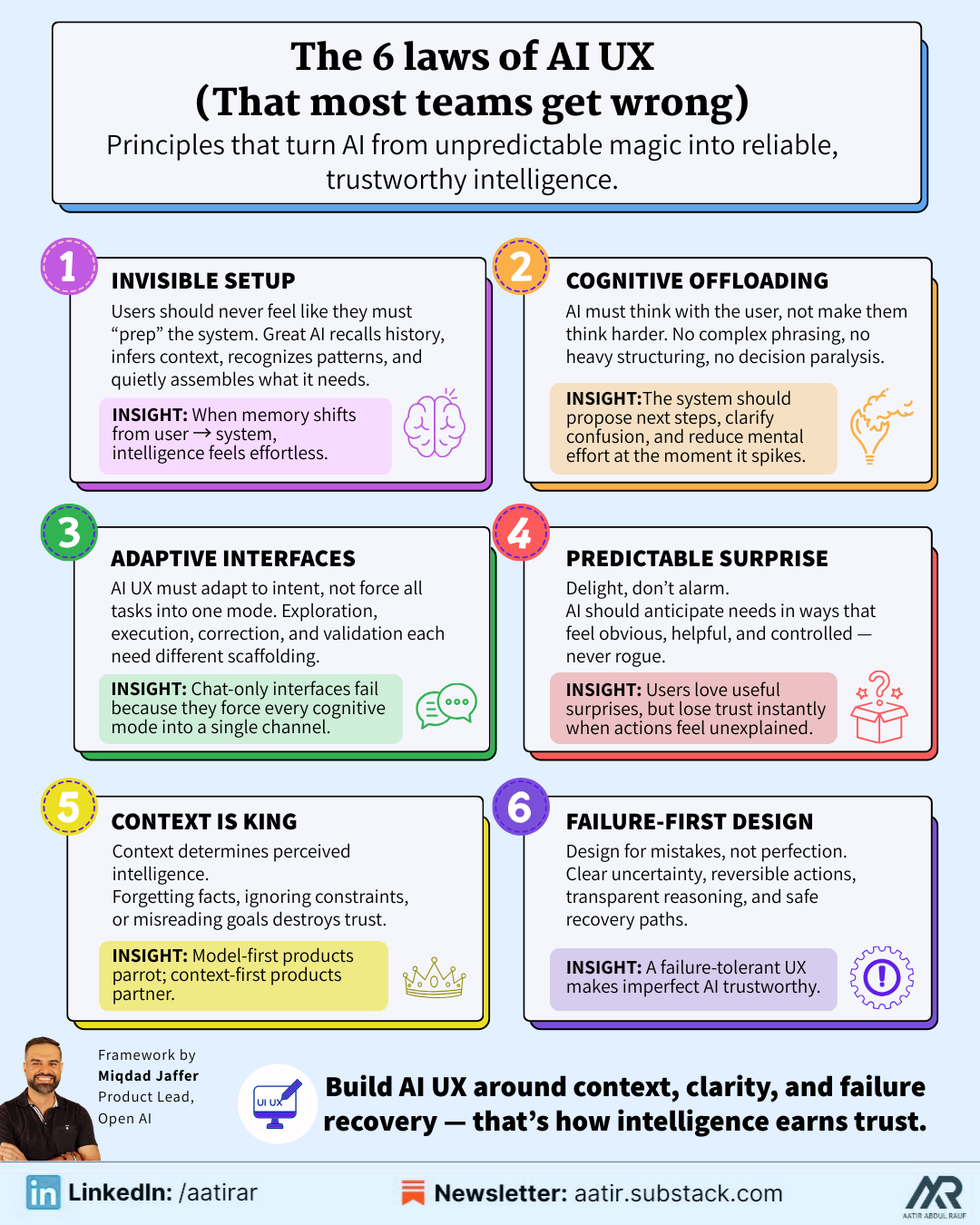
LAW 1: The Law of Invisible Setup
If users feel like they must “prepare” the system before using it—by gathering documents, typing long context, rewriting instructions, summarizing past work, or reminding the AI what they said earlier—then the UX is already broken.
A truly intelligent product makes context invisible.
It does not wait for users to tell it what they need; it recalls relevant history, interprets metadata, infers meaning from patterns, notices references, and quietly assembles the right state before the user even asks.
The more context the system captures automatically, the more the user feels like the machine “gets them,” and the less they feel like the machine is an obedient but high-maintenance assistant.
When the burden of memory shifts from the user to the system, the entire product feels exponentially more powerful and dramatically easier to use.
LAW 2: The Law of Cognitive Offloading
Most AI products fail not because the model is weak but because the system still forces the user to think too much: about what to say, how to phrase it, what constraints to specify, what parameters to choose, or what next step makes sense.
AI UX excels when the product reduces mental effort at the exact moment effort spikes.
Users shouldn’t have to structure their thoughts, choose between complex actions, decide what to do next after receiving an output, or restructure messy goals into clean prompt instructions.
The system should shoulder that responsibility by surfacing recommended next steps, proposing structures automatically, summarizing confusion into clarity, and guiding the user toward outcomes without demanding expertise.
When the system does the mental labor, users feel like they’re collaborating with a partner, not programming a model.
LAW 3: The Law of Adaptive Interfaces
AI-driven interfaces must be dynamic, not static. They should adapt to the user’s intent in the moment, not the persona in the persona document.
A user who is exploring a new idea needs a different interface from a user who is executing a well-defined task.
A user clarifying an error needs different guidance than a user trying to validate model output.
A user with high uncertainty requires scaffolding; a user with high confidence requires speed.
Static interfaces assume a single mode of interaction.
Adaptive AI interfaces assume multiple cognitive modes and respond accordingly.
This is why chat-only products fail: they force every mode: ideation, correction, review, instruction… into one interaction channel. The best AI products shape themselves around user intent as it evolves, creating a fluid adaptive flow rather than a rigid UI.
LAW 4: The Law of Predictable Surprise
AI should astonish users with helpfulness, not alarm them with unpredictability.
The line between magic and fear is extremely thin in AI UX.
Users love being surprised in ways that save time, anticipate their needs, or reveal patterns they couldn’t see.
But they hate being surprised in ways that remove control, introduce risk, or generate outcomes that feel unearned or unexplained.
Predictable surprise means designing intelligence that is impressive but never feels rogue; valuable but never destabilizing; powerful but always contextualized.
The moment AI takes an action without clear permission (or produces a result without visible reasoning) the user’s trust collapses and is almost impossible to rebuild.
LAW 5: The Law of Context Is King
Context is the true engine of intelligence.
The system’s ability to incorporate relevant information, understand the user’s goal, infer missing pieces, and integrate past interactions determines 80% of the quality users perceive.
A model without context is a parrot.
A model with context is a partner.
Every moment where the system forgets something the user already told it, or ignores an obvious piece of information, or misinterprets a simple instruction, is a direct violation of trust.
This is why the best AI products aren’t model-first, they’re context-first.
LAW 6: The Law of Failure-First Design
AI UX is not designed around success, it is designed around failure.
Because AI will misunderstand, hallucinate, over-assume, under-assume, generalize incorrectly, interpret vaguely, or produce results that conflict with user expectations.
The UX must anticipate these failures and build recovery mechanisms so intuitive and so emotionally safe that the user never feels betrayed by the system’s mistakes.
This requires clarity, not opacity; reversibility, not permanence; guidance, not silence; and humility, not hidden behavior.
A failure-tolerant UX makes imperfect AI feel trustworthy.
A failure-intolerant UX makes even high-quality AI feel dangerous.
4.3: The Seven UX Traps That Destroy AI Products
These are the most predictable failure patterns in AI UX, and even the strongest engineering teams regularly fall into them:
TRAP 1: Over-Automating Too Early
Teams rush to give users autonomous agents because it feels futuristic, but users have zero interest in surrendering control to a system they do not yet trust.
Early-stage users want to feel supported, not replaced; supervised, not overridden.
Autonomy is not a selling point until trust exists, and trust only exists when the system demonstrates consistency, restraint, and humility.
Premature autonomy is the fastest way to scare users away.
TRAP 2: Under-Guiding During High-Ambiguity Moments
In the pursuit of “clean UX,” teams remove instructions, reduce affordances, simplify screens, or hide complexity.
But AI workflows create ambiguity by default, and users need guidance more than ever… especially when the system is uncertain, the instructions are vague, or the task has multiple interpretations.
Minimalistic UI during ambiguous AI tasks doesn’t reduce friction; it amplifies confusion.
TRAP 3: Producing Outputs Without Explanation
When an AI produces a result that looks good but provides no sign of how it arrived there, the user’s immediate reaction is not delight, it’s suspicion.
Even when the answer is correct, opacity destroys trust because humans rely on narratives to validate intelligence.
AI must provide breadcrumbs of reasoning, not detailed logs, but structured, human-readable cues that say: “Here’s what I understood; here’s what I prioritized; here’s why I chose this path.”
Without explainability, there is no trust.
TRAP 4: Collapsing Everything Into a Chatbox
Chat is a communication modality, not a UX paradigm.
It cannot carry planning, review, editing, branching, error correction, tool invocation, or multi-step workflows without becoming cognitively overwhelming.
When everything happens in a single chat stream, the user loses the ability to navigate tasks, understand structure, or separate objectives.
The result is chaos disguised as convenience.
TRAP 5: Silent Failures
When an agent fails a tool call, retrieves the wrong context, hits an error, or becomes uncertain… but does not communicate any of this… the user perceives it as stupidity rather than uncertainty. Hidden failure erodes trust faster than visible mistakes.
AI must never fail silently.
TRAP 6: Punishing Users for Exploring
If pricing models, interface friction, rigid flows, or unclear boundaries discourage users from playing with the product, they will never reach the “aha” moment where value becomes self-evident.
AI is discovered through exploration, not instruction.
TRAP 7: Expecting Users to Think Like Engineers
If your product requires users to think in JSON schemas, manage parameters, understand embeddings, choose models, structure prompts, or debug tool calls, then it is not a product, it is a developer console dressed in a UI.
Users should never need to think like engineers.
The system should translate human intent into machine instructions, not the other way around.
4.4 Designing Intelligent Workflows Instead of Intelligent Screens
STEP 1 — Identify Cognitive Bottlenecks Instead of UI Bottlenecks
Most PMs still analyze UX the way they always have: look for visual friction, navigation problems, unnecessary steps, or complex interfaces. But AI products create a different kind of bottleneck, cognitive complexity. The real bottlenecks emerge when users hesitate because they’re unsure what to say, what the system expects, what the model understood, or what the next step should be.
Mapping these cognitive friction points gives you the real architecture for your AI workflow.
STEP 2 — Convert Every Bottleneck Into an Intelligent System Behavior
Once you identify where cognitive friction occurs, the next step is to translate each friction point into an opportunity for intelligence.
If users hesitate, the system should propose next steps.
If users struggle to articulate, the system should interpret intent. If users supply partial instructions, the system should infer missing details. If users face ambiguity, the system should ask clarifying questions.
This is why AI UX is more about thinking than drawing.
STEP 3 — Design the Failure Path Before the Success Path
In SaaS, the success path is the primary workflow.
But in AI, the failure path is the real product.
Because AI will fail: consistently, unpredictably, and invisibly.
Designing the failure path means planning how the system handles uncertainty, communicates ambiguity, asks for more detail, surfaces model confidence, and gracefully recovers without overwhelming the user.
A brilliant failure path creates the illusion that the AI rarely fails at all.
STEP 4 — Optimize the First 30 Seconds of Interaction
The first 30 seconds determine whether the user perceives the system as intelligent or incompetent.
This time window decides adoption, trust, usage, pricing willingness, and whether the user believes the AI is “worth integrating into their workflow.”
A great AI product establishes clarity, safety, and competence instantly by showing users that it already remembers context, already understands patterns, and already knows how to guide the next step.
STEP 5 — Design for Continuous Learning and Evolving Intelligence
A static AI product feels lifeless. A learning AI product feels alive.
The best AI products gradually adapt to the user: they learn tone, preferences, data patterns, recurring workflows, contextual boundaries, and the style in which the user likes to think. Over time, the system shifts from being a general assistant to a personalized collaborator, creating compounding value that becomes impossible to replace.
This is the ultimate advantage of AI UX: the product improves simply because the user keeps using it.
Chapter 5: The Five Layers & 4 Risks of an AI System (Every PM Must Understand)
You don’t need to know how to code these layers but you must understand what each one does, what it depends on, and where it fails.
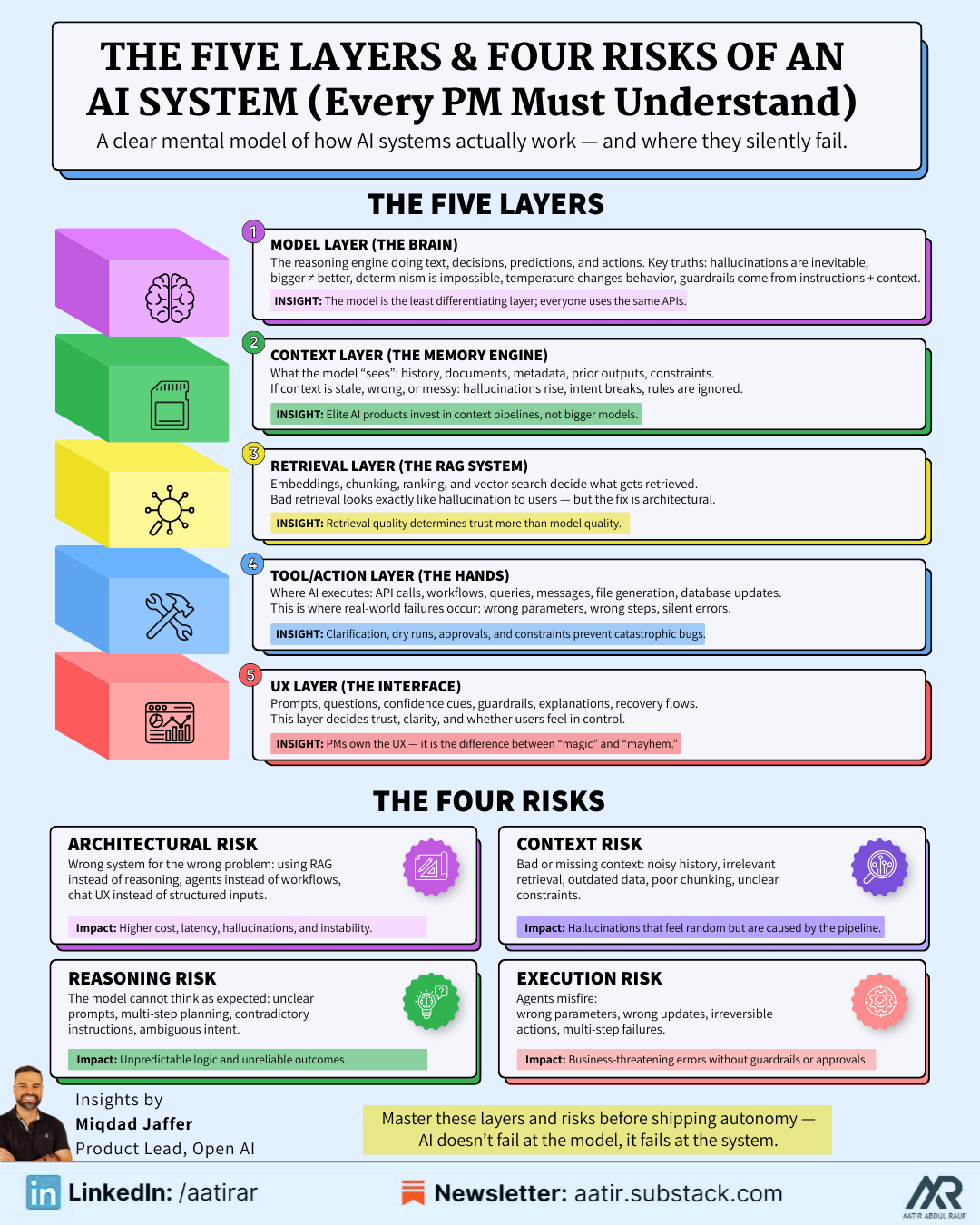
Layer 1: The Model Layer (The Brain)
This is the LLM/transformer/model API doing the reasoning.
It produces text, analysis, actions, predictions, classifications, or transformations.
Important to understand:
Models hallucinate by nature
Bigger is not always better
Determinism is impossible
Temperature matters more than you think
Guardrails depend on instructions + context, not “safety magic”
The model is the least differentiating layer.
Everyone can call the same APIs.
Your advantage comes from the layers around it.
Layer 2: The Context Layer (The Memory + Information Engine)
This layer determines what information the model “sees” when making decisions:
user instructions
prior history
structured data
unstructured documents
retrieved snippets
previous outputs
metadata
constraints
system instructions
This is the layer PMs underestimate the most.
If your context is wrong, stale, incomplete, or poorly structured:
the model will hallucinate
the model will ignore rules
the model will misunderstand intent
the model will produce erratic behavior
This is why world-class AI products invest in context pipelines, not bigger models.
Layer 3: The Retrieval Layer (The RAG System)
Retrieval-Augmented Generation is how your model accesses relevant information:
embeddings
similarity search
chunking
vector databases
ranking strategies
A RAG system determines whether the model retrieves the correct data before answering or retrieves something irrelevant and hallucinates a confident lie.
Bad retrieval looks exactly like hallucination to the user.
But the fix is architectural, not model-driven.
Layer 4: The Tool/Action Layer (The Hands)
This is where the AI executes actions instead of just generating text:
calling APIs
triggering workflows
running queries
sending emails
creating tickets
generating files
updating databases
interacting with applications
This is what makes an agent useful instead of interesting.
But this is also where things break catastrophically if not designed carefully:
tools fail
APIs return errors
arguments mismatch
steps run out of order
guardrails fail
autonomy becomes dangerous
Your job as PM is to ensure the system:
asks for clarification when uncertain
performs dry runs
surfaces errors
requests approval
follows constraints
This is where you prevent embarrassing demos and catastrophic bugs.
Layer 5: The UX Layer (The Interface Between Human and Intelligence)
This is where everything comes together:
prompts
templates
clarifying questions
confidence indicators
explanations
guardrails
user instructions
system feedback
error recovery
This layer determines whether the user “trusts” the intelligence or fears it.
And PMs own this layer entirely.
The UX layer decides:
how users instruct the system
how the AI interprets vague intent
how the UI guides the user through uncertainty
how results are displayed
how next steps are suggested
how failure feels
This is the reason AI UX is so strategically important.
The Four Types of Technical Risks Every AI PM Must Manage
Non-technical PMs often fall into the trap of treating feasibility as an engineering decision.
But in AI, feasibility is shared between engineering and product.
AI features fail not because of code but because risks were not surfaced early enough.
Risk 1: Architectural Risk
(Wrong components, wrong assumptions, wrong foundations)
This risk emerges when PMs try to build the wrong system:
using RAG when the problem needs reasoning
using an agent when a simple workflow works
using chat UX when structured input is required
using a big model when small models suffice
using tool calls when data retrieval is enough
Choosing the wrong architecture multiplies cost, latency, hallucinations, and product instability.
PM responsibility: Define the problem correctly before defining the solution.
Risk 2: Reasoning Risk
(The model cannot think the way you expected it to)
Reasoning risk appears when:
prompts are unclear
instructions contradict each other
the task requires multi-step planning
the model misinterprets nuanced instructions
the user provides ambiguous input
Define how the model should reason, not just what it should output.
Risk 3: Context Risk
(The system feeds the model the wrong information)
This is the most common failure point because context pipelines are fragile:
missing context
irrelevant retrieval
outdated memory
incorrect chunking
unclear constraints
noisy history
Define context rules: what the system should retrieve, remember, ignore, and prioritize.
Risk 4: Execution Risk
(Agents or tool calls behave dangerously)
This is where “AI is unpredictable” becomes a real business threat:
tool calls with the wrong parameters
queries that modify the wrong data
emails sent accidentally
irreversible changes
multi-step workflows misfiring
Define guardrails, confirmation flows, and reversible actions before shipping autonomy.
The AI Product Feasibility Checklist
This is the checklist top PMs use to validate an AI feature before the first line of code is written.
Is the task deterministic, probabilistic, or agentic?
Do users need accuracy, speed, or both?
Does the workflow require context the system does not yet capture?
Does the system require memory, and if so, what kind?
Is retrieval needed—or is reasoning enough?
Does this benefit from a chat interface or a structured modal?
What is the worst-case scenario of autonomous actions?
What clarifying questions must the system ask before executing?
How will uncertainty be displayed to users?
What constraints must be enforced at all times?
Where does the workflow break if context is missing?
What fallback behavior protects users when the model is unsure?
What metrics will define success vs. instability?
What is the expected latency budget?
What minimum viable intelligence level is required to ship this?
If you cannot answer these questions, the feature is not yet feasible.
Chapter 6: Positioning - The Differentiator That Decides Whether Your AI Product Wins or Disappears
In simple words, Positioning is the deliberate act of defining who your product is for, what job it exists to do, and why someone should choose it over every other option available to them… communicated so clearly that the intended user immediately feels,
“This is built for someone like me.”
Most people think positioning is a tagline, a slogan, or a marketing statement.
It’s not.
Positioning is a strategic choice about:
the identity of the user you are serving,
the problem you’re solving at a depth no competitor touches,
the workflow you are taking responsibility for,
the outcome you promise to deliver consistently,
the fears you are removing from the user’s mind,
and the segments you are intentionally ignoring so the right users recognize themselves instantly.
Positioning is not about describing your product.
Positioning is about defining its role in the user’s life.
Why Positioning Matters More in AI Than SaaS
AI products carry three unique risks:
1. AI feels like magic… until the user realizes it’s generic.
The moment an AI product feels like “the same thing I can do anywhere,” differentiation collapses. This is why uniquely positioned AI products cut through noise instantly.
2. Users judge AI by fit, not features.
People don’t ask: “What can this tool theoretically do?”
They ask: “Does this tool understand me, my domain, my workflow, and my constraints?”
3. General-purpose AI is a race to zero.
If your positioning is “We do everything,” you automatically compete with:
ChatGPT
Claude
Gemini
Perplexity
and every new foundation model that drops
You cannot out-generalize a general-purpose model.
You can only out-specialize it.
Positioning Examples That Show Why This Matters
Let’s break down two powerful positioning moves in the market:
1. Lovable — Positioned for Non-Coders (Perfectly, Deliberately)
Lovable is not trying to win against GitHub Copilot or Replit or VSCode extensions.
It is not trying to win the “best model” or “best coding agent” contest.
It wins by being emotionally aligned with a very specific user:
The non-technical person or every day user.
Lovable’s positioning message is:
“You don’t need to code, just describe what you want.”
This is a psychological position, not a technical one.
It tells the user:
“You belong here.”
“You won’t be judged here.”
“You won’t get stuck.”
“We won’t overwhelm you with developer language.”
Lovable thrives because it is not fighting for correctness.
It is fighting for confidence and approachability.
This is world-class positioning.
2. Claude Code — Positioned for Practitioners, Not Beginners
Anthropic did something incredibly smart:
They didn’t build a coding tool for everyone.
They built it for serious builders who need:
REPL-level accuracy
multi-file debugging
dependency resolution
tool usage
structured outputs
chain-of-thought planning
memory of codebases
and deep context understanding
The positioning says: “This is for people who already know what they’re doing and want superpowers.”
The Big Lesson: Positioning Is About Who You Are NOT Serving
Lovable wins because it deliberately excludes developers.
Claude Code wins because it deliberately excludes beginners.
This is the heart of positioning:
If your product tries to talk to everyone, it resonates with no one.
If your product tries to be useful for everyone, it becomes indispensable for no one.
If you don’t intentionally define your user, the market will define it for you — usually incorrectly.
How to Position Your AI Product the Right Way
Use this template:
1. Who is this for? (identity positioning)
→ “This is built for [role] who struggles with [specific pain].”
2. What job does it solve perfectly? (job-to-be-done positioning)
→ “This tool is for people doing [workflow] where speed/accuracy/context matters.”
3. What fear or friction does it remove? (psychological positioning)
→ “You don’t need to worry about [fear], because we handle [X].”
4. What emotional promise does it offer? (value positioning)
→ “You will feel [emotion] when you use it.”
5. Who is this not for? (exclusion positioning)
→ “This is not built for [group].”
If you can’t answer these 5 clearly, your product is already losing.
Chapter 7: Launching AI Products the Right Way: Adoption Psychology, Distribution Playbooks, Onboarding Design, and the AI-Specific GTM Strategies You Can’t Ignore
Most companies launch AI features as if they’re launching a SaaS button: they create a landing page, rewrite the hero headline, tell design to add a little sparkle effect around the new AI widget, and publish a product walkthrough on LinkedIn.
Then they wonder why only 2% of users try it, why 80% of that 2% churns immediately, and why the model keeps producing confusing results.
But AI launches are not like SaaS launches for one simple reason:
AI requires user trust before users can experience value, and SaaS requires user value before users can develop trust.
This reversal creates a completely different sequence of launch steps, onboarding flows, pricing choices, and distribution channels. AI is probabilistic, nondeterministic, and deeply psychological. It shapes behavior differently, creates uncertainty differently, and must earn confidence differently.
Let’s break down how top PMs design AI launches… not as marketing events, but as trust-building systems.
But first you need to know the principles of AI launches:
7.1 Users Do Not Trust AI Until It Behaves Well in Their Own Context!
AI value is contextual. AI intelligence is contextual. AI trust is contextual.
A user will not trust your AI simply because:
OpenAI’s model is behind it,
or your landing page says “Powered by GPT-5,”
or your CEO posted a fancy demo video,
or you wrote “Your AI copilot” in your product marketing,
or early testers said good things about it.
Users only trust AI when:
It behaves well with their data,
It handles their workflows,
It understands their intent,
It recovers gracefully from their ambiguous instructions, and
It produces reliable results in their environment.
This is why most AI launches fail: teams expect trust to appear before usage, but trust only develops through usage. And to make this even more complicated, usage does not occur if trust is low.
This creates a loop:
No trust → No usage
No usage → No value
No value → No trust
Breaking this loop requires carefully engineered onboarding, messaging, and activation paths.
And that brings us to the second principle.
7.2 AI Onboarding Is Not About Setting Up the Product, It’s About Setting Up Trust**
In traditional SaaS onboarding, the goal is setup:
connect your account
configure your settings
understand where things are
watch a demo
start using the product
In AI onboarding, the goal is emotional: reduce fear, increase confidence, and create early feelings of competence.
AI onboarding must answer subconscious questions:
“Will this behave unpredictably?”
“Will it misunderstand me?”
“Is it safe to try?”
“Does it require technical knowledge?”
“Can it break anything important?”
“Does it actually know what I mean?”
“Will it get me fired if it gets something wrong?”
If your onboarding does not preempt these fears, your adoption rate will collapse.
Great AI onboarding does three things elegantly:
1. It gives users a safe start
→ AI that cannot do damage yet
→ reversible actions only
→ no autonomy until trust is built
2. It gives users a quick win
→ a fast output that feels smart
→ a small task the system does well
→ evidence of competence without risk
3. It gives users clarity
→ what the AI can do
→ what it cannot do
→ how it thinks
→ how users should interact with it
AI onboarding is not mechanical.
It is emotional engineering.
7.3 The Three-Layer Launch Framework
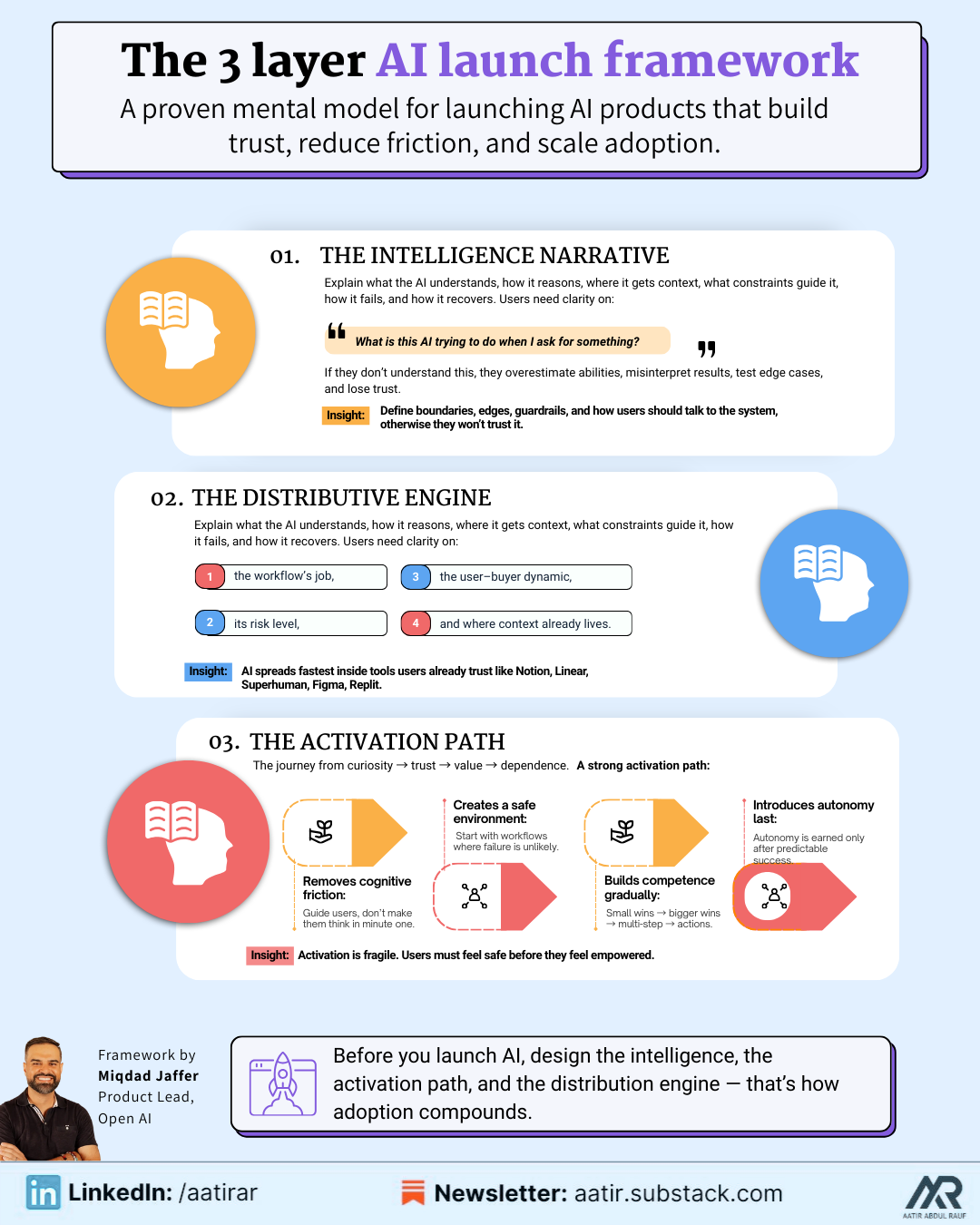
Every great AI launch follows the same three-layer structure:
Layer 1 — The Intelligence Narrative
This is the story of:
what the AI understands,
how it reasons,
where it gets its context,
what constraints control it,
what failure states exist, and
how it recovers when uncertain.
Users want to understand:
“What is the AI trying to do when I ask for something?”
If users don’t know this, they will:
overestimate its abilities,
blame it for misunderstandings,
test it in ways it cannot handle,
misinterpret results,
and lose trust quickly.
Your launch must communicate:
the boundaries of intelligence,
the edges of the system,
the guardrails that exist,
and how users should talk to the AI.
Most teams skip this entirely.
If users don’t understand the intelligence, they won’t trust the intelligence.
Layer 2 — The Activation Path
This is the path the user takes from curiosity → trust → value → dependence.
For AI products, the activation path is fragile because users enter with uncertainty.
A strong activation path does 4 things:
1. Removes cognitive friction: Don’t ask users to think hard in their first minute. Guide them. Show them examples. Help them express intent.
2. Creates a contained environment: Give users tasks where the AI cannot embarrass itself. Start with scoped workflows that the model does reliably. Expand complexity later.
3. Builds competence gradually: Let users see the AI succeed on small tasks. Then bigger tasks. Then multi-step tasks. Then tool-based tasks.
4. Introduces autonomy last: Never give autonomy to a user who hasn’t seen the system behave well. Autonomy is a reward for trust, not a starting point.
Layer 3 — The Distribution Engine
Distribution is not about content.
It is about fit, timing, and relevance.
AI products spread when:
the problem is painful,
the solution feels magical,
the workflow replaces manual effort immediately,
and the results are demonstrably better.
Your distribution strategy must align with:
the job the AI is doing,
the risk level of the workflow,
the decision-maker vs user dynamic,
and where context already lives.
This is why tools like Notion, Superhuman, Figma, Linear, and Replit have explosive AI adoption—they launch AI directly inside the user’s existing workflow, where trust already exists.
7.4: The 10 Psychological Triggers That Drive AI Adoption
These triggers are not “nice to know” ideas, they’re the underlying emotional levers that decide whether someone uses your AI once and forgets it, or integrates it into their daily workflow and tells their team about it.
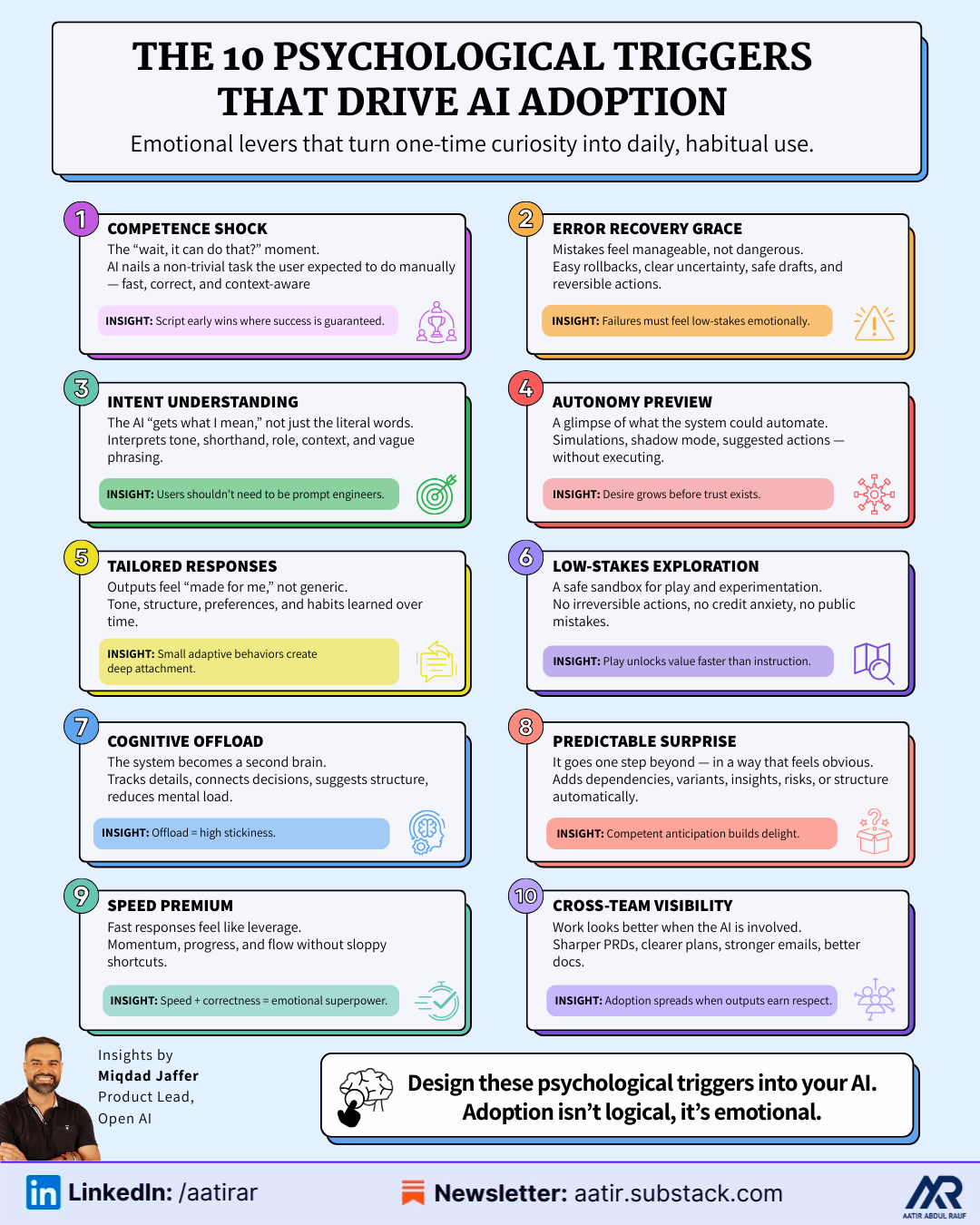
Think of them as switches you design into the experience, not accidents you hope will happen.
Trigger 1 — Competence Shock
(“Wait, it can do that?”)
This is the moment when the user goes from curious to hooked.
It’s not when the AI simply responds; it’s when the AI does something the user fully expected to do themselves and does it better, faster, and with less effort than they anticipated.
This can look like:
turning a vague sentence like “Draft a customer follow-up based on my last email” into a clean, tone-aligned, context-aware message pulling in details from the thread
automatically reorganizing a messy chunk of data into a structure the user didn’t even know they needed
taking a half-formed goal and turning it into a step-by-step plan that feels suspiciously like what an experienced colleague would produce
The key is: the AI must perform a task that feels non-trivial but still obviously correct. If it’s trivial, there’s no shock. If it’s impressive but off, there’s no trust.
You design for competence shock by deliberately scripting early interactions where the system has maximum context, low risk, and a very high probability of nailing the output.
Trigger 2 — Error Recovery Grace
(“Even when it’s wrong, I don’t feel screwed”)
AI will make mistakes.
The real question is whether those mistakes feel:
dangerous,
confusing, or
manageable.
Error recovery grace is the feeling a user gets when the AI messes up but the product makes it trivial to:
correct the behavior,
refine instructions,
roll back an action,
or safely ignore the bad output.
For example:
the AI misinterprets a task, and instead of pretending everything went fine, it clearly states: “I might have misunderstood… here’s what I did, here’s where I’m unsure, want to adjust?”
an agent suggests actions but never executes them without a human confirm, meaning errors show up as drafts, not disasters
the system keeps a “change history” that lets users revert with a single click
You create this trigger by designing for failure first and making sure the emotional cost of an AI mistake is low.
Trigger 3 — Intent Understanding
(“It gets what I mean, not just what I say”)
Most users are not prompt engineers. They shouldn’t need to be.
Intent understanding is the moment users realize they don’t have to phrase things perfectly to get useful results. That’s when they stop treating the product like a brittle interface and start treating it like a colleague who “gets their style.”
This can show up as:
interpreting “summarize this for my boss” differently from “summarize this for a junior teammate” without the user specifying tone and level explicitly
handling “clean this” as data normalization in a table and “clean this” as editing in a document
turning shorthand like “same as last week but more aggressive” into a contextual change in a marketing plan or outreach flow
To engineer this trigger, you deliberately:
teach the system to infer intent from context (who the user is, where they are, what they’ve done before),
program clarifying questions when ambiguity is too high,
and ensure the product doesn’t punish imperfect instructions with nonsense outputs.
When users feel like the system “meets them halfway,” their usage multiplies.
Trigger 4 — Autonomy Preview
(“If I fully unleashed this, it could run half my workflow”)
Full autonomy is scary… but hints of autonomy are intoxicating.
Autonomy preview is when the user gets a glimpse of what the system could do for them if they trusted it more: auto-generating sequences, scheduling actions, cleaning data at scale, handling repetitive approvals, running multi-step workflows.
This doesn’t mean you flip on “autopilot” from day one. It means you show, in controlled, low-risk ways:
“Here’s what I would do if you gave me permission.”
“Here’s a simulation of the actions I’d take.”
“Here’s a batch of drafts I created that you can approve or reject.”
You might:
show a list of 20 actions the agent could take today based on current context, but require explicit approval
run agents in “shadow mode,” where they propose decisions without executing them yet
periodically surface “This could be automated” prompts in areas where the user repeatedly does the same manual steps
The preview builds desire without triggering fear.
Autonomy becomes an aspiration, not a threat.
Trigger 5 — Tailored Responses
(“This feels made for me, not for ‘users like me’”)
There’s a big difference between generic personalization (“Hey Name…”) and real personalization, where the system adapts to the way you think, write, decide, and work.
Tailored response triggers happen when the user realizes:
the system remembers their tone,
respects their preferences,
preserves their structure,
and aligns with their internal standards over time.
Concrete examples:
the AI stops over-explaining once it notices the user always skips long paragraphs
it starts using the specific words and phrases the user favors in emails or documents
it learns how “formal” or “casual” the user really is in practice, rather than just relying on an initial setting
it gradually adjusts output format (bullets vs. narrative vs. tables) based on what the user tends to keep and what they tend to delete
When this happens, the user feels almost protective of the system — as if it’s tuned to them in a way that a competitor’s product wouldn’t be.
You design for this trigger by baking in memory, feedback loops, and small adaptive behaviors, instead of resetting every interaction back to “default mode.”
Trigger 6 — Low-Stakes Exploration
(“I feel safe trying things I don’t fully understand yet”)
If users feel like they can “break” something, waste credits, send something embarrassing, or trigger irreversible changes, they will default to caution.
Caution kills learning. Learning drives adoption.
Low-stakes exploration is about creating a sandbox where users feel:
nothing truly bad can happen here,
trying weird ideas won’t cost them,
and the system won’t publicly embarrass them.
That might mean:
a clearly labeled “Playground” or “Ideas” area separate from production workflows
no emailing, publishing, or permanent changes allowed from early experiments
unlimited or very forgiving usage in the first days/weeks, before strict billing kicks in
The aim is to get the user to play… because once they play, they discover value you never could have explained to them upfront.
Trigger 7 — Cognitive Offload
(“I don’t have to hold this in my head anymore”)
This might be the most addictive feeling in AI.
It’s when the user realizes they no longer need to:
keep track of scattered details,
remember edge cases,
mentally simulate steps,
juggle multiple threads of thought,
or plan everything themselves.
The system becomes a second brain for a specific domain: meeting notes, strategy exploration, backlog grooming, campaign planning, QA scenarios, user research synthesis, and so on.
You engineer this trigger by designing workflows where AI:
suggests structure when users are unstructured,
remembers what was said earlier,
connects previous decisions to current tasks,
and proactively reminds users of things they might otherwise forget.
Once a user trusts the system enough to “hand off thinking,” they become extremely sticky.
Trigger 8: Predictable Surprise
(“It goes beyond what I asked… but in a way that feels obvious in hindsight”)
The best AI products don’t just follow instructions; they anticipate side needs.
You ask for a summary… it adds key bullet takeaways.
You ask for a plan… it adds risks and dependencies.
You ask for an email copy… it adds subject-line variants and CTAs.
You ask for analysis… it adds chart ideas and segmentation.
The surprise is pleasant, not confusing, because it still fits the user’s mental model of what a thoughtful assistant would do. It doesn’t introduce new complexity; it resolves unseen complexity.
The risk: if you overshoot and the surprise feels unrelated, overbearing, or random, it starts to feel like the AI is “hallucinating behaviors,” not just content.
Predictable surprise is achieved by asking:
“What would a highly competent human naturally add here?”
And then teaching the system to do that consistently.
Trigger 9 — Speed Premium
(“This feels like cheating—in a good way”)
Speed is emotional.
When AI responds quickly, users experience:
a feeling of leverage,
an illusion of superhuman throughput,
the sense that they are moving faster than their environment.
The trick is not raw speed; it’s visible speed without visible sloppiness.
If the system returns something impossibly fast and wrong, speed hurts you. But if it returns something fast and useful, the user starts associating your product with “momentum.” It becomes the thing they open when they want to make progress quickly.
Speed premium is especially important for:
exploratory work (brainstorming, first drafts, shaping ideas),
repetitive tasks (summaries, rewrites, formatting),
and internal workflows where latency kills flow (internal tooling, ops, support).
You design for it by:
making sure the first response appears fast (even if full processing continues),
chunking long processes into visible stages,
and avoiding “silent thinking” screens where nothing appears to happen.
Trigger 10 — Cross-Team Visibility
(“My work looks better when I’ve used this tool”)
AI adoption rarely stays individual for long.
The real growth happens when using the AI becomes a status-enabling act inside the team: your outputs look sharper, more thoughtful, more polished, more complete.
That might mean:
your PRDs suddenly have sharper edge cases and clearer risks,
your strategy docs have better structured options and tradeoffs,
your customer emails feel more empathetic and coherent,
your decks look more narrative and less random.
When colleagues ask, “How did you put this together so fast?” and the user says, “I used this AI,” you’ve hit cross-team visibility.
To enable this, you:
make sharing dead simple (links, comments, embeds, export),
preserve structure and formatting that makes outputs “presentation-ready,”
and avoid producing content that looks “AI-generic”; it should make the user look better, not like they copy-pasted from a bot
At that point, your product stops being a tool and starts being a quiet advantage.
7.5: The Seven AI Launch Plays (Deeper, With Real Mechanics)
Play 1 — Launch With the Smallest, Most Reliable Workflow
Most teams want the demo that gets applause.
The best teams want the workflow that never embarrasses them.
Your first live AI workflow should be:
tightly scoped,
context-rich,
low-risk,
easy to understand,
and extremely hard for the system to get catastrophically wrong.
For example:
summarizing internal docs with clear structure,
drafting follow-ups from a known email thread,
turning support conversations into structured tickets,
synthesizing meeting notes into decisions + action items.
Why? Because early on you are not selling breadth of capability; you are selling proof of competence.
A reliable, “boring” workflow that works every time does more for long-term adoption than a spectacular demo that occasionally fails in weird ways.
Play 2 — Build One Hero Use Case That Is Unreasonably Good
(and Make Everything Else “Nice to Have”)
A hero use case is not a feature, it’s a promise: “Whenever you need to do this specific thing, you should instinctively think of our product.”
That might be:
turning raw call transcripts into crisp sales follow-up systems,
transforming messy research notes into fully structured product insights,
or converting a chaotic backlog into a clean, prioritized roadmap draft.
The hero use case must:
be tightly tied to a core job-to-be-done,
feel significantly better than how users currently solve it,
and be easy to demo in under 60–90 seconds.
You then build your launch assets, onboarding, narrative, pricing, and GTM around this one thing.
Everything else the AI can do? That’s bonus. It can emerge later. But the hero use case is your spearhead.
Play 3 — Introduce Autonomy in Phases, Not All At Once
Most AI agents die because they jump to step 4 without doing steps 1–3.
A better autonomy progression looks like:
Suggestive mode – “Here’s what I would do next.”
Draft mode – “I’ve done it, but I’m showing you everything before it goes live.”
Guarded execution – “I’m allowed to execute these actions automatically, but I’ll ask you for approval for those actions.”
Full autonomy under constraints – “I will continuously operate in this bounded area unless you change the rules.”
You communicate each transition explicitly, with:
what has changed,
what cannot happen,
how to revoke permission,
and where logs and previews live.
In other words: autonomy is not a toggle — it’s a staircase.
Play 4 — Replace “Prompt Boxes” With Context Packs
Instead of asking users to write prompts, give them pre-built configurations that encode:
goal,
context sources,
constraints,
output format,
tone,
and steps.
For example:
“Turn call transcript → Deal summary + next steps for CRM.”
“Backlog → 4-week sprint plan with risks highlighted.”
“Interview transcript → JTBD + pain map + top 5 insights.”
Users can still tweak, but they start from a well-designed mental model, not a blank canvas.
Context Packs help you:
standardize quality across users,
encode best practices,
protect against vague instructions,
and reduce time-to-value dramatically.
Play 5 — Design a Two-Layer Launch Funnel: Safe Delight → Serious Work
Instead of throwing users straight into high-stakes workflows, introduce your AI in two stages:
Safe Delight Layer – low-risk, emotionally rewarding, visually impressive tasks.
Great for demos, first-time use, curiosity.
Example: summaries, rewrites, content generation, idea expansion.
Serious Work Layer – high-value, high-leverage workflows that affect outcomes.
Great for retention, stickiness, monetization.
Example: decision support, planning, execution, automation.
Your launch journey should escort users: Curiosity → Delight → Confidence → Dependence
Too many teams try to jump directly from “New AI feature!” to “Trust us with mission-critical workflows.” That’s a leap. You want a ramp.
Play 6 — Script the First 30 Minutes of the User Journey Like a Live Show
This is where you think like a director, not just a PM.
Ask:
What’s the very first thing the user sees?
What’s the first task they are encouraged to try?
What does the AI return the very first time?
What does the system say when it’s unsure?
When do they first experience competence shock?
When do they first see error recovery grace?
When do they see a preview of autonomy?
When do they see “this could actually save me time every week”?
You can:
pre-fill example inputs,
show a “Try this” panel with 3–5 high-success prompts or context packs,
guide them through a storyboarded workflow,
and trigger helpful explanations at exactly the right moments.
If you don’t script this, early experiences become random and fragile.
If you script it well, the user walks away feeling, “This just works.”
Play 7 — Use Proof as Distribution, Not Adjectives
Instead of saying:
“We’re the most advanced AI…”
“World’s smartest AI copilot…”
“Game-changing AI assistant…”
…you show:
a 30-second video where messy input → crisp, high-value output,
side-by-side “before AI / after AI” workflows,
screenshots of real work improved by the tool,
GIFs where people see the system make useful choices in real-time.
You make your product easy to brag about.
When someone using your product screenshots an interaction and sends it in Slack with “yo this is insane,” you’re doing distribution right.
Proof compels. Hype fades.
Steal this System Prompt to Craft a Launch Strategy for Your Product
You are an expert AI Product Manager, GTM strategist, and adoption psychologist.
Your task is to generate a complete AI launch strategy tailored to my product.
Here is my product information:
1. Product Name: [PRODUCT NAME]
2. What the AI feature does: [CAPABILITIES]
3. Who the primary user is: [PRIMARY USER]
4. The workflow this AI replaces or improves: [WHAT IT REPLACES/IMPROVES]
5. The risk level of this workflow (low/medium/high):[RISK LEVEL]
6. The context/data sources the AI uses: [CONTEXT DOCS]
7. The biggest fear or hesitation users might have: [BIGGEST FEAR]
8. The single most important moment for trust: [TRUST MOMENT]
9. The output quality needed (tight, structured, narrative, critical, etc.): [QUALITY]
10. How autonomy should behave (suggest → draft → approve → execute): [AUTONOMY TYPE]
Now generate the following:
1. AI Launch Narrative (Explainable Intelligence)
Explain to users:
what the AI understands
how it reasons
what context it uses
what constraints guide it
how it avoids errors
how it recovers from uncertainty
Write this in clear, user-friendly language.
2. Trust-Centered Onboarding Flow
Design a step-by-step onboarding experience that:
reduces fear
builds confidence
delivers a quick win
clarifies boundaries
shows competence safely
prevents early hallucinations
Include:
first task
first success moment
first “aha” moment
first corrective moment
first reinforcement loop
3. Activation Path (Curiosity → Trust → Value → Dependence)
Create a full activation journey for my users:
what they try first
what they try second
how complexity increases
when they see autonomy
what creates habit formation
what makes the product indispensable
4. Distribution & GTM Strategy (AI-Specific)
Recommend:
the right channels
the right moments
the right personas
the right demo path
the ideal “hero workflow”
proof-driven content to share
what to avoid (e.g., hype)
5. The 10 Psychological Triggers (Customized)
Generate ALL 10 triggers tailored to my product:
Competence Shock
Error Recovery Grace
Intent Understanding
Autonomy Preview
Tailored Responses
Low-Stakes Exploration
Cognitive Offload
Predictable Surprise
Speed Premium
Cross-Team Visibility
Write each trigger as:
what it means
how my AI feature will deliver it
what the user will feel
an example moment inside my product
6. The 7 AI Launch Plays (Customized)
Rewrite all 7 plays specifically for my product:
Smallest Reliable Workflow
One Hero Use Case
Autonomy in Phases
Context Packs (Not Prompts)
Two-Layer Funnel (Safe Delight → Serious Work)
Scripted First 30 Minutes
Proof-as-Distribution
Each should include:
what I launch
why it works
how users respond
how it builds trust
what to avoid
what success looks like
7. Final 30–Day Launch Plan
Include:
Pre-launch messaging
Launch-day script
Week 1 expansion
Week 2 improvements
Week 3 activation push
Week 4 adoption loops
It’s Aatir again.
Phew - what amazing insights on AI product launches. I’d like to thank Miqdad Jaffer for all his efforts to put this together for the BPL community.
Lots to consume and take in. Curious - I’d love to know:
What frameworks and ideas resonated with you the most?
Where are you currently struggling when it comes to positioning and distribution?
Till next time,
Aatir
 | A guest post by
|
Thank you Aatir and Miqdad Jaffer. Your experince through this wonderful guidance helps me a lot as we're developing an AI based Observability platform tailored for Internet Service Provider (ISP/Telecom). This greatly helps in every phase of it. Appreciate your time and effort to make a such a valuable article to be adopted by startup like us.
Love the framing that PMs now manage trust, not features. And the call out on hidden AI costs quietly destroying margins. I totally agree that, in AI-native products, the trust surface is threefold: how the model behaves, how it fails, and how the pricing x value system feels relative to the outcomes you get.
I have been working on that last layer with something I call the Adaptive Value System (linking to my Substack post for reference: https://bit.ly/4iy2HFU), treating pricing as a living system, value units, pools, exploration zones, safety rails, and rating agility tuned to the current product or business north star. As you point out, different pricing models push different user behaviors, exploration, hoarding, or overuse, so most teams end up with a hybrid system tailored to segments.
On your question about positioning and distribution, this idea really resonates: AI requires user trust before users can experience value, while SaaS requires value before users develop trust. The hardest part I see is people’s mindset and organizational structure. Teams still work in functional silos, but in AI, you need product, infra, pricing, positioning, distribution, sales, and CS designed as one system, especially across customer journeys in B2B, not as handoffs between departments.